
Views: 0 Author: Site Editor Publish Time: 2026-06-03 Origin: Site


Legacy wired printing setups often cause severe operational friction. Long cables clutter modern countertops. They trap staff behind registers. Checkout bottlenecks frustrate waiting customers. Agile retail and hospitality environments demand ultimate flexibility. A Bluetooth Thermal POS Printer solves these critical issues natively. It serves as a powerful business helper. It accelerates transaction throughput seamlessly. Untethered hardware empowers your team to serve customers anywhere. We designed this article to provide a fluff-free evaluation framework. We base our insights on real-world evidence and practical daily use cases. We help decision-makers choose hardware matching their specific operational volume. You will discover exactly how to evaluate core technical metrics. We will guide you through crucial software ecosystem checks. Prepare to optimize your daily checkout workflow and eliminate persistent bottlenecks.
Mobility vs. Reliability: Bluetooth offers flexibility for pop-ups, cottage food businesses, and line-busting, but requires managing battery lifecycles and signal interference.
Ecosystem Match: Hardware is only as good as its software compatibility; native support for iOS/Android POS apps and ESC/POS commands is non-negotiable.
Selection Logic: Buy based on peak-hour print volume, primary operating system, and required paper width (58mm vs. 80mm).
Modern checkout experiences demand untethered hardware. Tableside dining requires servers to close out tabs directly at the table. Food trucks operate in extremely tight physical spaces. Farmer's markets completely lack traditional electrical infrastructure. Small retail shops often use mobile tablets. They deploy these tablets to bust lines during peak holiday hours. A wired printer severely limits these flexible operations. It traps your staff in one physical location. You lose valuable time walking back and forth between the customer and the counter.
Contrast thermal printing against traditional impact or inkjet models. Thermal printers use specially treated heat-activated paper. They eliminate messy ink ribbons entirely. You never need to replace sticky toner cartridges. This fundamental difference drastically reduces maintenance routines. Thermal hardware operates quietly. It generates crisp receipts instantly without smudging.
Defining a successful rollout requires establishing clear operational benchmarks. What does success look like for your team? We recommend evaluating several critical factors:
Zero dropped connections: The device stays securely paired during chaotic rush hours.
Rapid output: Sub-5-second receipt generation keeps customer lines moving swiftly.
Seamless pairing: Non-technical staff can reconnect devices instantly after a morning reboot.
Upgrading your hardware should actively eliminate daily friction points. It must simplify your operational flow rather than adding technical hurdles.
Evaluating hardware requires looking past glossy marketing materials. You must translate technical specifications into tangible business outcomes.
Print speed directly impacts customer wait times. Manufacturers measure this metric in millimeters per second (mm/s). If your printer runs at 90mm/s, a standard receipt takes several seconds to print. At 300mm/s, it finishes in under a single second. This translates directly into lines cleared per minute. High-speed models handle rush hour effortlessly.
Resolution also plays a critical role. DPI (Dots Per Inch) determines overall print clarity. A 203 DPI printer handles standard text perfectly. Many modern businesses print scannable QR codes. They include detailed custom logos on receipts. You need sharp contrast for these elements. Blurry QR codes stall the checkout process. Customers cannot scan them for loyalty points or digital surveys.
Wireless protocols define operational reliability. Compare Bluetooth 4.0 against 5.0 in commercial environments. Bluetooth 5.0 offers significantly longer range. It provides lower latency. It also consumes much less battery power. Older versions often drop connections when staff walk too far away from the terminal.
Commercial environments regularly push these wireless limits. Fallback interfaces remain absolutely necessary. Always ensure your device has USB or Type-C ports. These physical ports provide emergency redundancies. If wireless signals fail entirely, a hardwired connection saves the shift. Never rely exclusively on a wireless signal for mission-critical operations.
Assess mAh (milliampere-hour) ratings carefully. A 2000mAh battery might promise three days of standby time. However, standby time rarely reflects reality. Heavy printing drains batteries rapidly. Continuous peak-volume printing might only last eight hours on that exact same charge.
Look for intelligent auto-sleep functions. These features conserve energy during inevitable operational downtime. Understand realistic charge times before deploying mobile units. If a battery takes four hours to recharge fully, you need backup batteries on hand. You cannot afford dead equipment during a busy lunch rush.
Form factor dictates where you can physically place the device. Compare the two standard paper widths: 58mm and 80mm.
A 58mm printer offers a highly compact footprint. It fits perfectly into mobile operations. Cottage food setups benefit heavily from this smaller size. However, the narrow paper limits how much text fits on one single line.
An 80mm printer serves as the retail standard. The wider paper accommodates detailed line items comfortably. It neatly formats complex return policies. Evaluate the internal loading mechanism as well. Easy-drop-in designs save crucial seconds. Anti-curl technology keeps receipts flat. Flat receipts look far more professional to the end consumer.
Feature | 58mm Format | 80mm Format |
|---|---|---|
Ideal Environment | Mobile, Pop-ups, Food Trucks | Retail counters, Restaurants |
Physical Footprint | Highly compact, pocket-sized | Desktop, stationary focus |
Information Density | Limited text per line | High text capacity, fits policies |
Speed Range | Typically 50 - 90 mm/s | Often 200 - 300 mm/s |
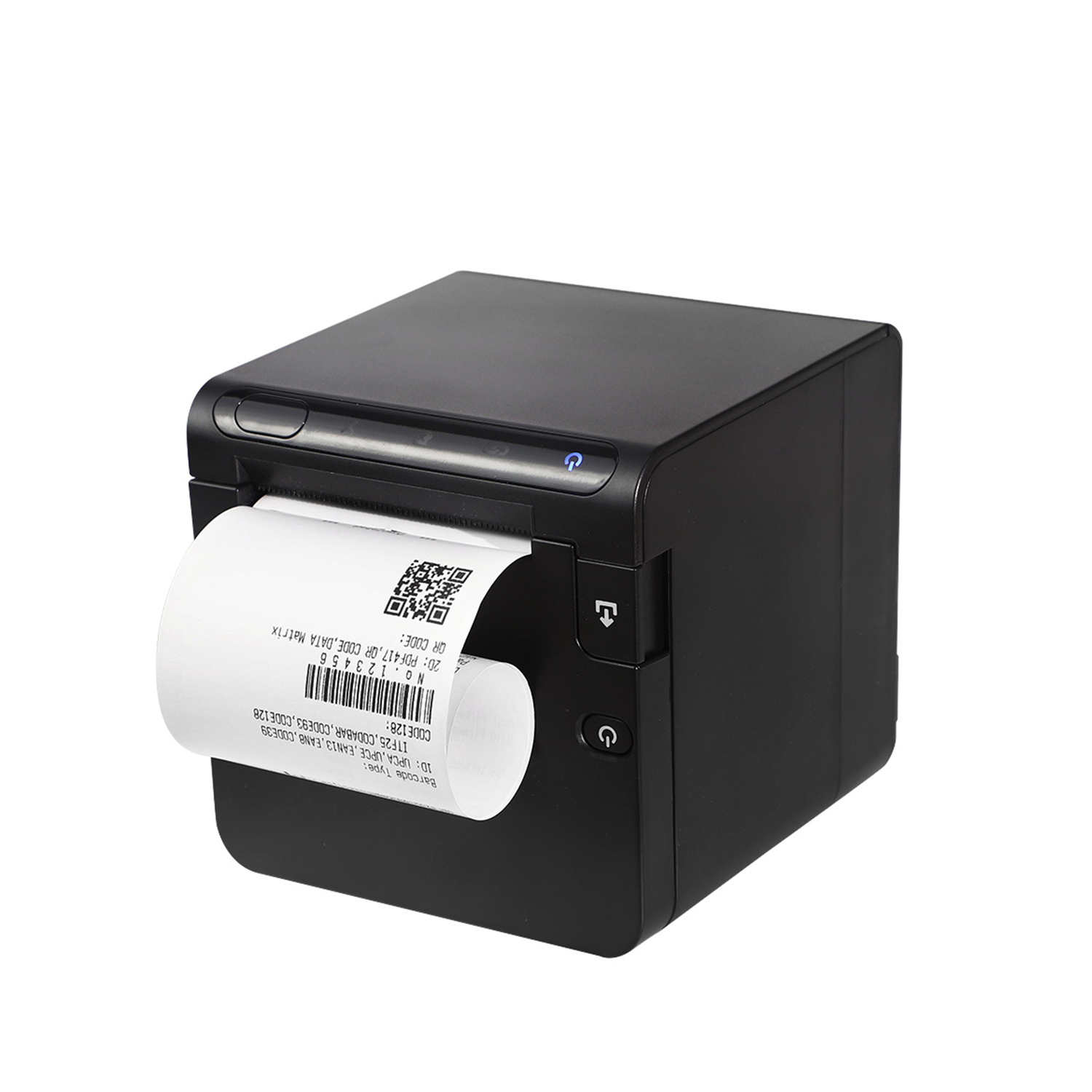
Hardware is only as good as its underlying software. A robust physical device becomes useless without proper digital integration.
Pairing across iOS, Android, and Windows often reveals hidden hurdles. Hardware brands frequently claim broad compatibility. However, real-world application varies significantly. A Bluetooth Thermal POS Printer functioning flawlessly on Android might face severe restrictions on iOS. Apple enforces strict wireless protocols. They require specific MFi (Made for iPhone/iPad) certifications for certain hardware connections. Always verify precise OS compatibility before buying.
Common Mistake: Purchasing a fleet of printers based solely on Android testing, then attempting to deploy them on newly purchased iPads. This oversight creates immediate operational paralysis.
You must differentiate proprietary SDKs from plug-and-play support. Some printers require complex software development kits (SDKs). This forces you to hire developers. They must build custom bridges between the app and the printer.
Better options offer native plug-and-play support. They seamlessly connect to major POS software. Square, Shopify, Toast, and Loyverse dominate the modern market. Your printer must talk to your chosen software natively. Check the officially supported hardware list of your POS provider. If the printer is not listed, proceed with extreme caution.
ESC/POS command compatibility acts as the global industry standard. This protocol tells the printer exactly how to format text. It controls automatic cutting mechanisms. It triggers cash drawer kicks. Custom-built applications rely heavily on ESC/POS commands.
Third-party receipt formatting apps also demand this compliance. Without it, you cannot customize your receipts properly. You might lose the ability to print barcodes. Ensure the manufacturer explicitly guarantees ESC/POS support in their technical documentation.
Every technology carries inherent limitations. Acknowledging these risks ensures smoother daily operations. You can proactively mitigate issues before they impact customers.
Wireless signals face invisible obstacles constantly. Dense environments pose serious risks. Heavy Wi-Fi routing disrupts connections. Industrial microwaves in commercial kitchens interfere with radio frequencies. Dozens of active customer smartphones create massive signal congestion.
Address this risk by keeping devices close together. Minimize physical barriers between the tablet and the printer. If you operate in a congested food hall, test the connection during peak crowds. Human bodies absorb wireless signals. A connection functioning well in an empty room might fail during a packed evening event.
Thermal printing relies on heat-sensitive chemicals. This creates an honest operational limitation. Prints fade over time naturally. Heat and direct sunlight accelerate this fading process rapidly. Leaving a receipt on a hot dashboard destroys the text. Certain packaging adhesives erase the print entirely.
Thermal paper remains unsuitable for long-term archival records. Advise your customers to digitize receipts for long-term tax purposes. Store extra paper rolls in cool, dark environments. Never leave backup rolls near ovens or heating vents.
Portable units experience natural battery degradation. Heavy daily use takes a significant toll. Over 12 to 18 months, maximum charge capacity drops noticeably. A battery that initially lasted ten hours might only hold a six-hour charge later.
This impacts your long-term operational efficiency. Plan for eventual battery replacements proactively. Acknowledge this maintenance cycle when projecting hardware lifespans. Train staff to avoid leaving devices plugged in constantly. Overcharging degrades lithium-ion cells much faster.
Selecting the right device requires analyzing your specific environment. Do not overbuy features you will never use. Do not under-equip a high-volume checkout station.
Prioritize pocket-sized 58mm units. High battery life matters most here. Raw print speed takes a back seat to portability. Easy smartphone app integration ensures smooth operation at outdoor farmer's markets. You need a device you can easily clip to a belt or slip into an apron. Focus on models offering robust auto-sleep modes to preserve power during slow periods.
Prioritize 80mm desktop models. Treat Bluetooth as a secondary convenience connection. Rely primarily on a hardwired setup if possible. Focus heavily on heavy-duty auto-cutters. Demand print speeds exceeding 200mm/s. These models handle continuous lunch rushes without breaking a sweat. They hold larger paper rolls. This reduces the frequency of annoying mid-shift paper changes.
We strongly recommend ordering a single unit for a stress-test pilot. Never commit to a fleet-wide deployment blindly. Map out a quick testing checklist:
Measure pair time: Time how long it takes to connect from a cold boot.
Test print density: Print complex, dense logos to check for blurring.
Monitor battery drain: Track the percentage drop during a full eight-hour shift.
Evaluate recovery: Force a disconnect and observe how quickly the system recovers.
Check paper loading: Time staff members as they swap a new roll under pressure.
A rigorous pilot phase exposes hidden flaws immediately. It prevents costly operational failures down the line.
The ideal Bluetooth Thermal POS Printer perfectly aligns with your specific operational friction points. You must weigh the need for blazing speed against the necessity of true mobility. A stationary retail counter requires fundamentally different hardware than a bustling food truck. We place final emphasis on verifying software compatibility. Always confirm digital integration before evaluating physical hardware specs. A fast printer serves no purpose if it cannot communicate natively with your point-of-sale application. We encourage buyers to audit their current checkout workflow meticulously. Cross-reference your daily bottlenecks with the evaluation framework provided above. By doing so, you ensure your hardware upgrade genuinely enhances your customer experience.
A: No. Closed-ecosystem POS applications enforce strict hardware restrictions. Square and Shopify only natively support specific certified models. Additionally, iOS devices require printers with Apple's MFi (Made for iPhone/iPad) certification to enable stable connections. Always verify the officially supported hardware list on your POS provider's website before making a purchase.
A: ESC/POS is the industry-standard command protocol designed specifically for formatting receipt text, triggering auto-cutters, and opening cash drawers. TSPL is a command protocol used primarily for label printing. TSPL handles exact barcode placement and peel-off label spacing. Ensure your printer supports ESC/POS for standard checkout receipts.
A: Industry standards typically rate commercial thermal print heads for 50 to 100 kilometers of printed paper. For a busy retail environment, this translates to several years of continuous daily operation. Routine cleaning with isopropyl alcohol significantly extends the print head's lifespan by removing paper dust buildup.
A: The printer itself does not require internet access. It communicates locally with your tablet or smartphone via radio waves. However, your POS application might require an active internet connection to process payments or sync cloud data before generating the final receipt command.
